New nameStudio Pro is now MagicStream · same studio, new home

Your whole church broadcast,
run by one person.

The live-streaming studio built for churches. Unlimited cameras, every platform at once, an AI director, Bible verses that appear as the pastor reads them, and studio-quality sound you can mix from your phone.

Open in your browser
No payment to start Pay by M-Pesa or KCB English + Kiswahili In your browser or as a download
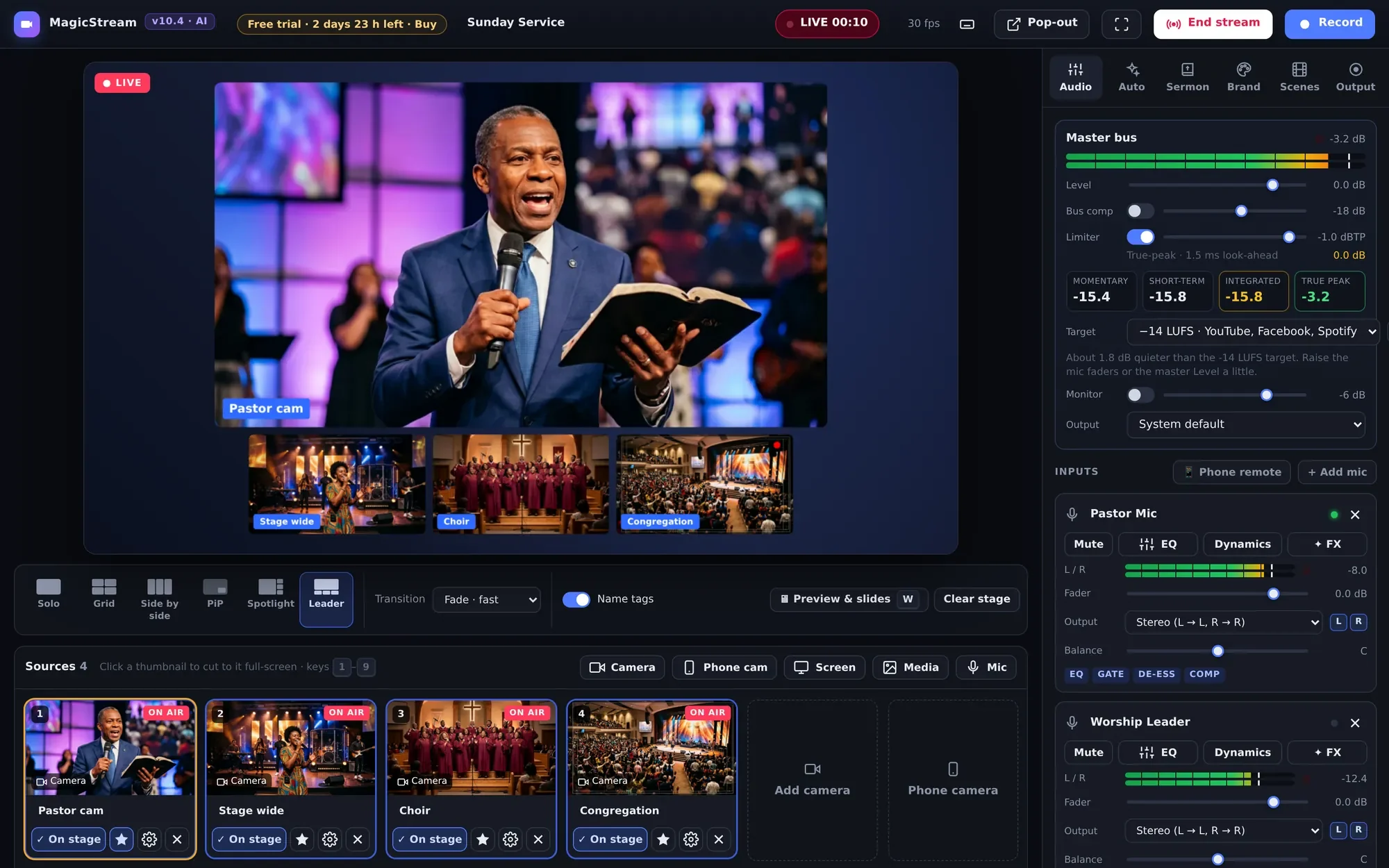
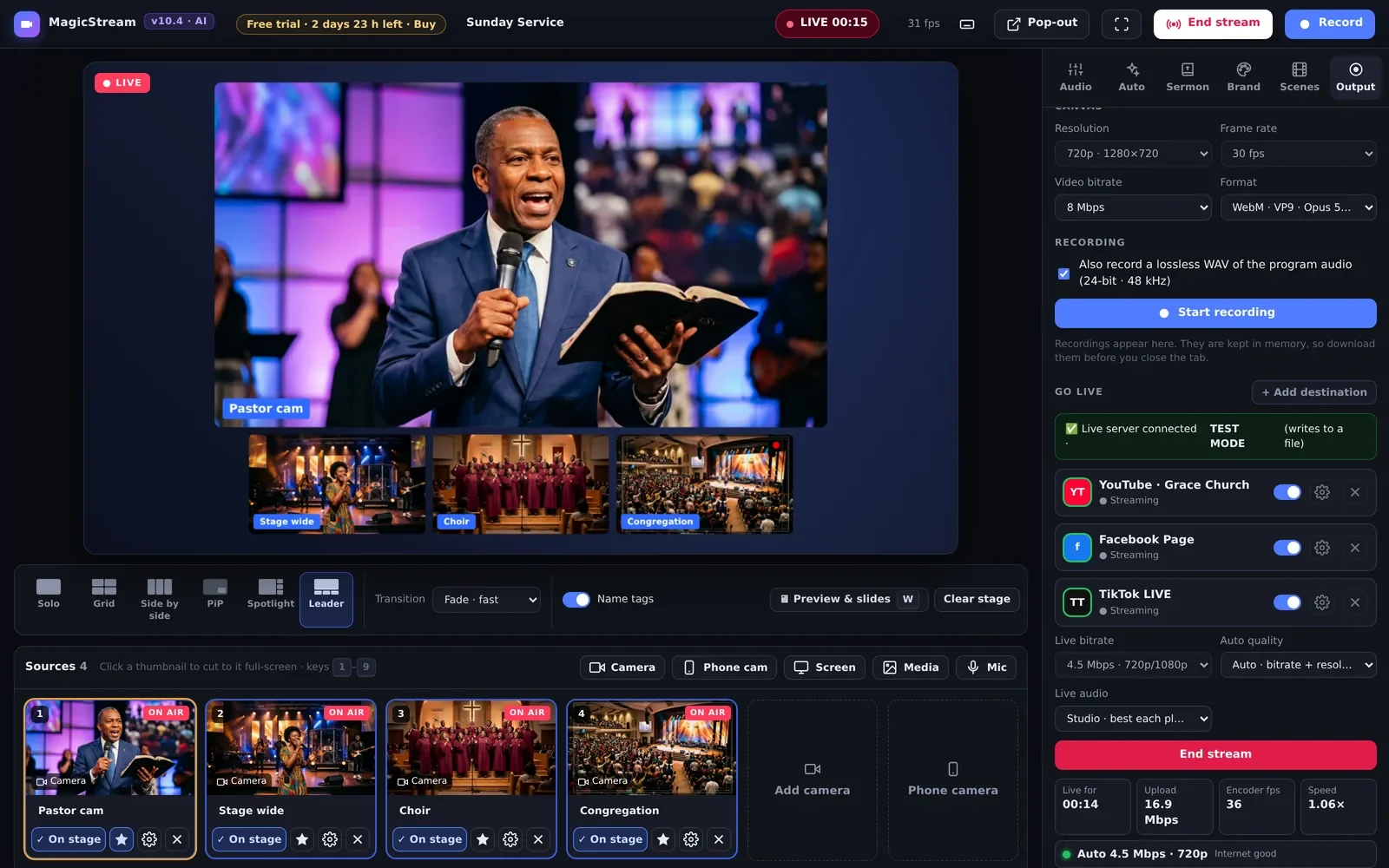
MagicStream · Sunday Service · Live
MagicStream live: four cameras in the leader layout, streaming to three platforms
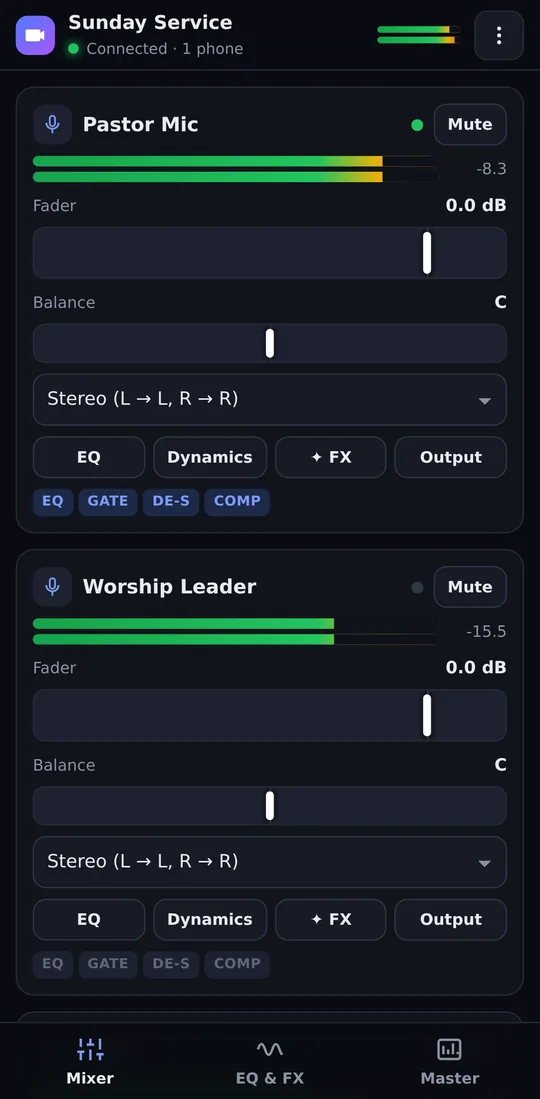
The phone sound remote

Stream to every platform at the same time

YouTubeFacebookTikTokTwitchKickLinkedInAny RTMP server
Unlimitedcameras, phones, screens and videos
All at onceevery platform from one computer, no restream fees
66 booksverses detected live in English and Kiswahili
48 kHzstudio sound with a −14 LUFS loudness meter
Everything a church broadcast needs

Built for Sunday, not for gaming.

One program replaces the switcher, the Bible software, the slide computer and the sound desk, so a single volunteer can run a professional service.

01AI camera director

A camera operator that never gets tired.

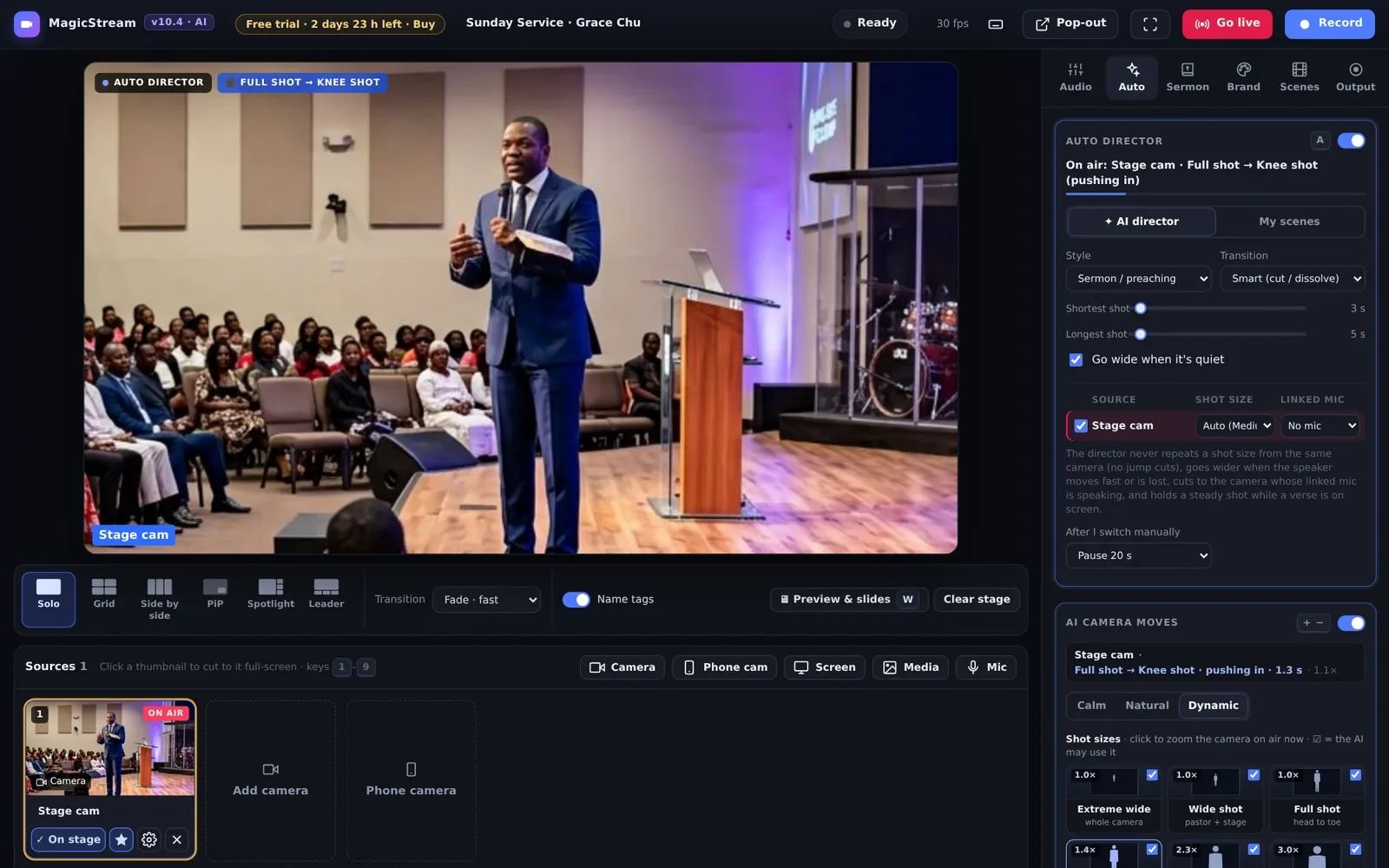
Turn on the director and MagicStream picks the right shot, the way a TV director does. It stays on the pastor while he preaches, goes wide for worship and cuts to the choir when they sing.

  • Follows the microphone. Link a mic to a camera and the director cuts to whoever is speaking.
  • 3 shots from 1 camera. Wide, medium and close-up with AI face framing that follows the pastor across the stage.
  • Real camera moves. Slow push-ins to a half shot, pull-outs to wide, shoulder shots, close-ups, over-the-shoulder and congregation shots. Even with one camera.
  • Your own scenes. Build "Worship", "Sermon" or "Altar call" and the director follows your rules, with no jump cuts.
Auto director
AI auto director with camera moves
02Scripture automation

The verse is on screen before the pastor finishes reading it.

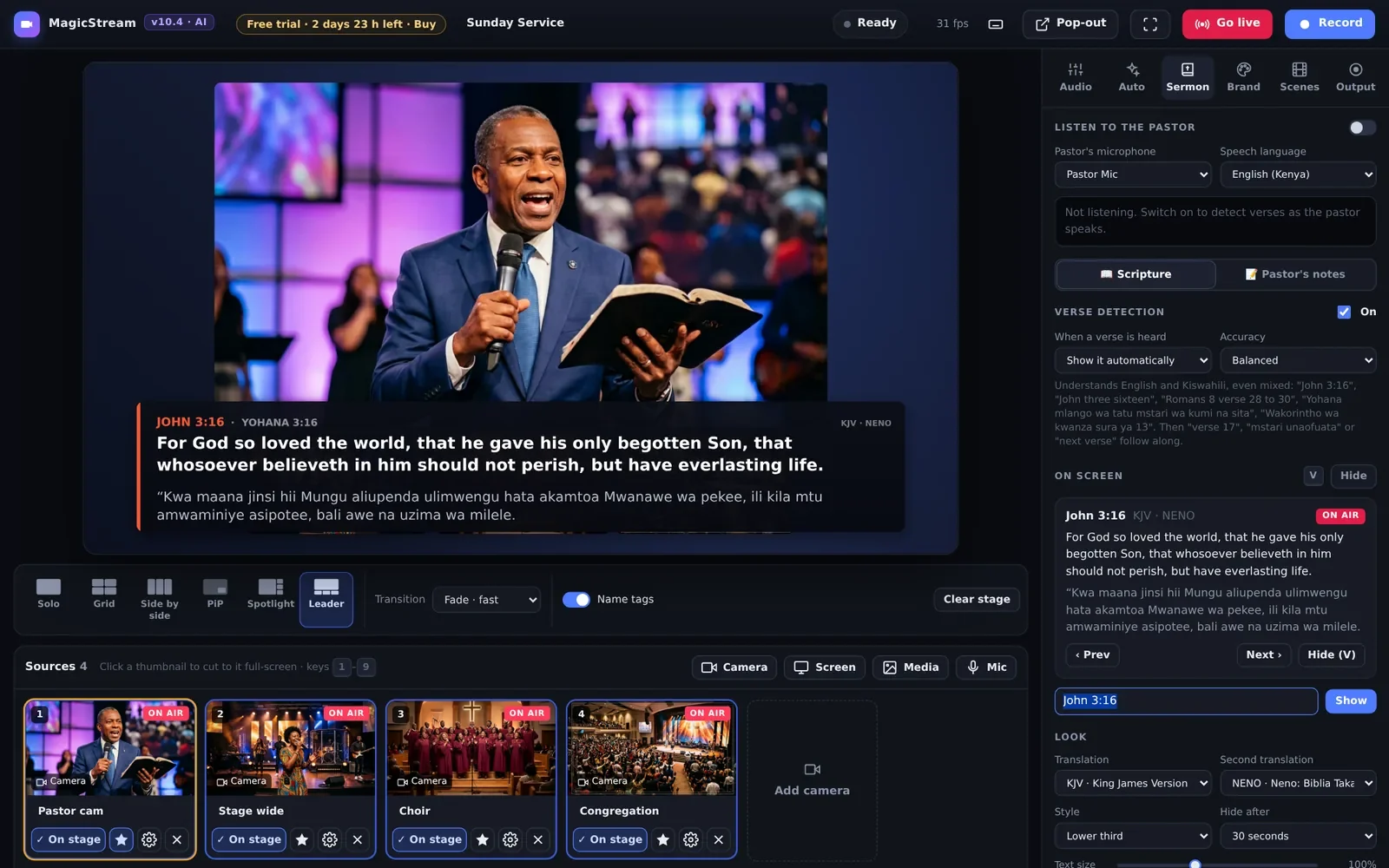
MagicStream listens to the pastor's microphone. When he says a reference, the verse appears as a clean lower third, in English, in Kiswahili or when he mixes the two.

  • KJV and Biblia Takatifu (Neno) built in, shown side by side if you like.
  • Understands "Romans 8 verse 28 to 30", "Yohana mlango wa tatu", "next verse" and "mstari unaofuata".
  • Pastor's notes. Upload the sermon notes and MagicStream shows the part the pastor is speaking now.
No more volunteers typing references in a hurry. The pastor speaks, the verse appears.
Sermon · John 3:16 · KJV + Neno
John 3:16 shown automatically in English and Kiswahili
03Slides and preview

PowerPoint on the stream, one slide ahead of the pastor.

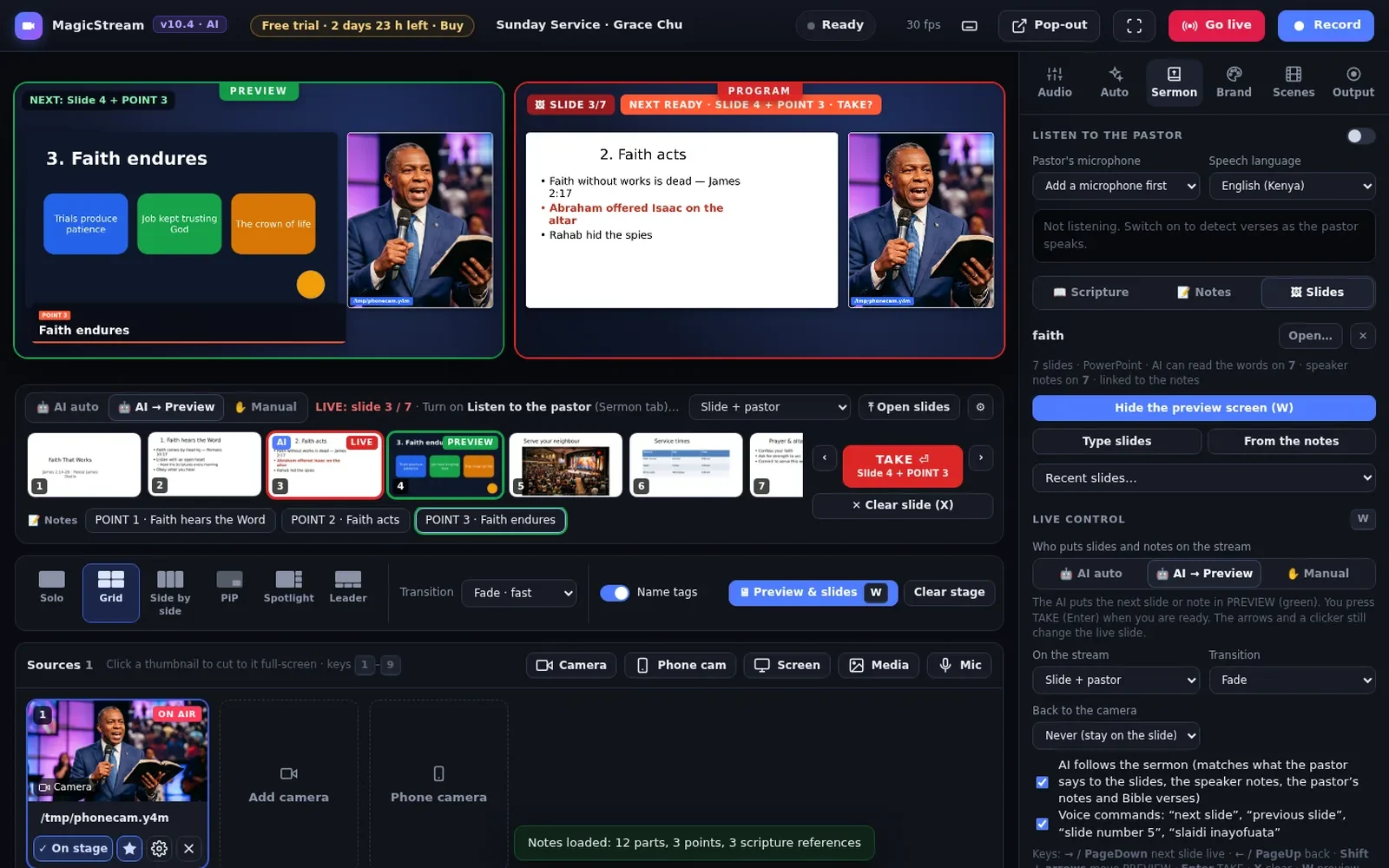
Open the sermon PowerPoint, a PDF or pictures. A green PREVIEW screen beside the red PROGRAM shows what goes live next. Press TAKE, use a presentation clicker, or let the AI do it.

  • AI auto. Follows what the pastor says and puts the matching slide and note on air.
  • AI to preview. The AI prepares the next slide, you press TAKE.
  • Manual. You click. Voice commands like "next slide" or "slaidi inayofuata" also work.
  • Pastor's screen with the slide on air, the next slide and the speaker notes.
Sermon · Slides · Preview + Program
Preview and program screens with PowerPoint slides and pastor's notes
04Studio-quality sound

Sound like a recording studio, not a phone in the back row.

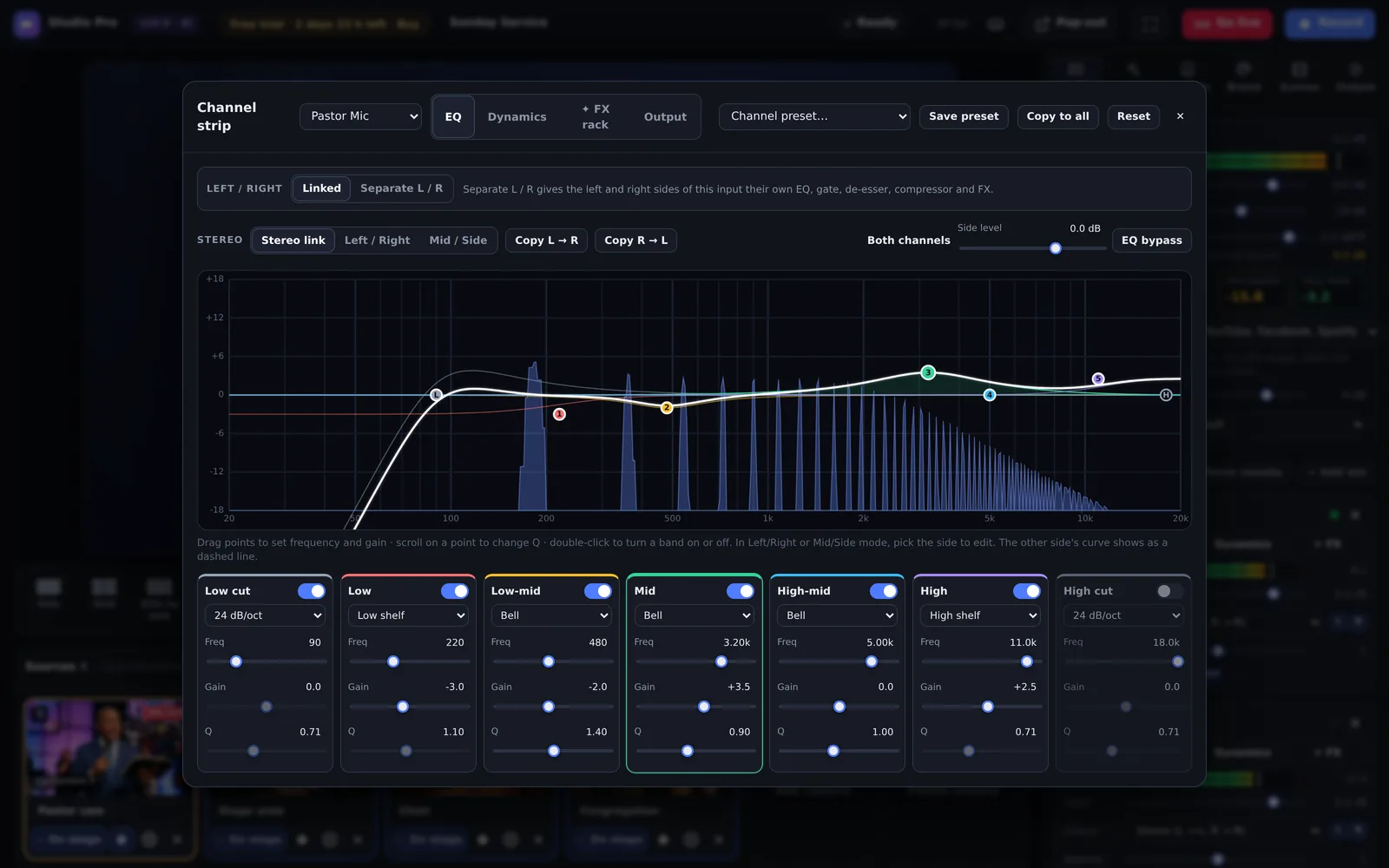
Every microphone gets a full professional channel strip. People keep watching when the sound is good, and leave within seconds when it isn't.

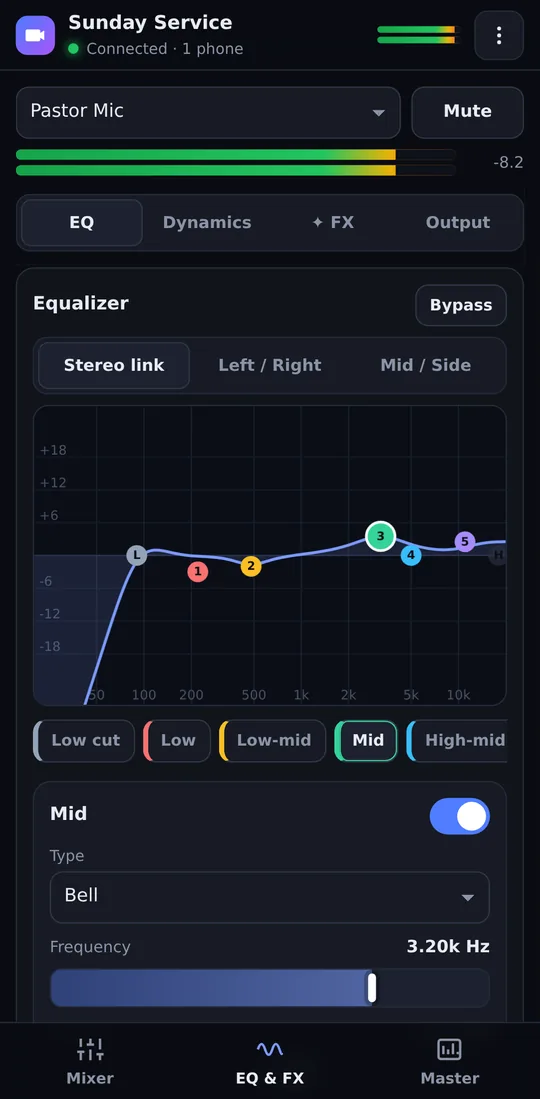
  • 7-band parametric EQ with a live spectrum, plus Left / Right and Mid / Side modes.
  • Each side processed separately. The left and right side of an input get their own EQ, gate, de-esser, compressor and FX, in one clean stereo mix.
  • Gate, de-esser, compressor, bus compressor and a true-peak limiter.
  • Loudness meter (LUFS) so you hit −14 LUFS for YouTube and Facebook every week.
Channel strip · Pastor Mic
Professional 7-band parametric EQ
05Smart Vocals

Make your choir sound like the record.

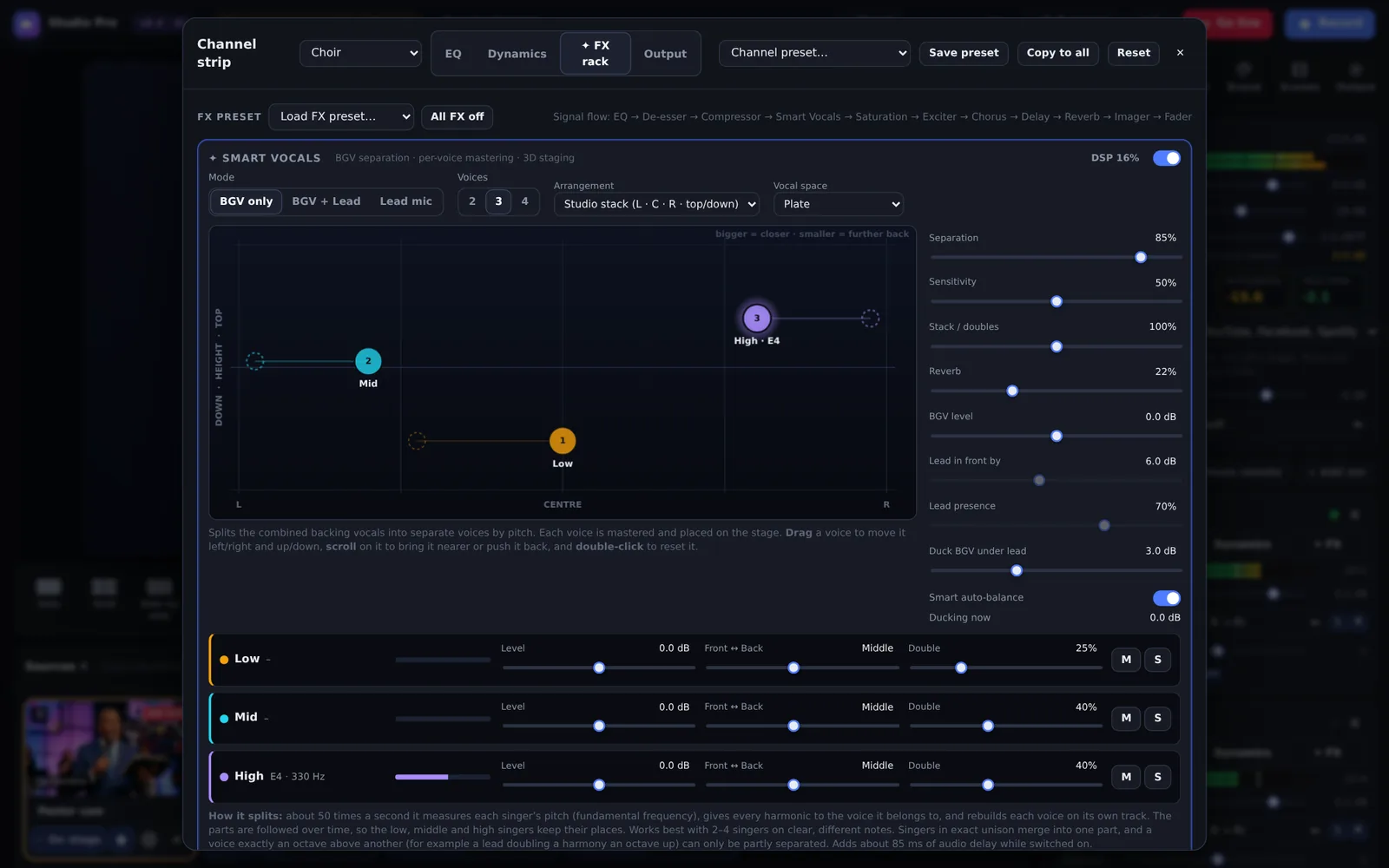
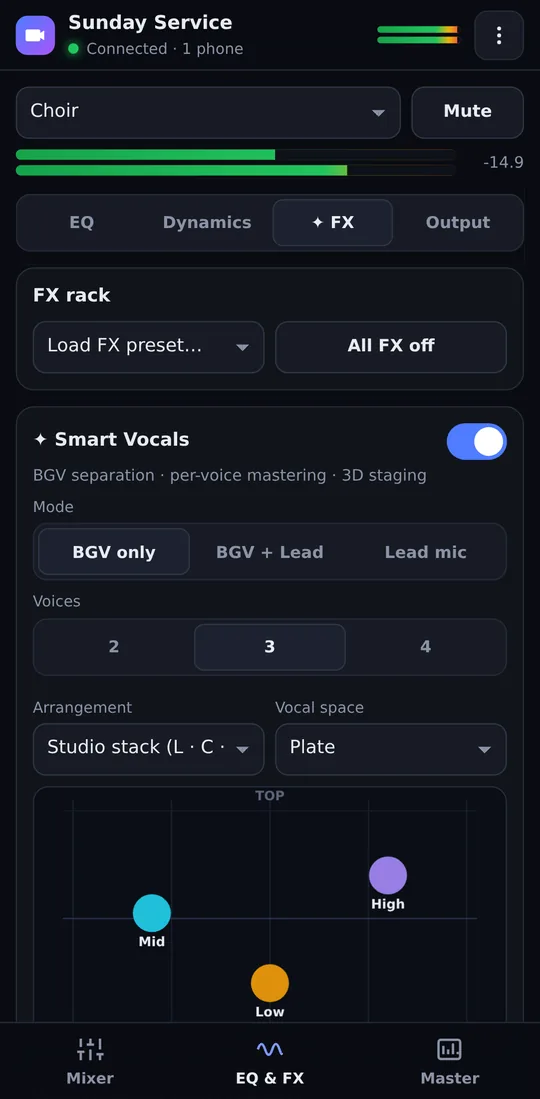
Smart Vocals takes one backing-vocal microphone and splits it by pitch into separate voices. Each voice gets its own studio processing and its own place around the listener: left, right, centre, high and low.

  • BGV only or BGV + lead. The lead stays in the middle and in front.
  • Doubling, plate and hall spaces, saturation and an exciter, all tuned for worship.
  • Light on your computer. Only the effects you switch on use any power.
FX rack · Smart Vocals
Smart Vocals placing each voice in 3D
06Multistreaming

One click. Every platform.

Paste the stream key from YouTube, Facebook, TikTok or any RTMP service and press Go live. MagicStream sends to all of them at once from your own computer, without a monthly restream service.

  • Up to 1080p at 60 fps with live health stats for every platform.
  • Auto quality follows your internet speed so viewers never see the spinning wheel.
  • Audio tuned per platform: up to 320 kbps for YouTube and 256 kbps for Facebook, at 48 kHz.
  • Record while live: a master copy and a lossless WAV of the sound.
Output · Live on 3 platforms
Going live on YouTube, Facebook and TikTok at once
New in version 10.0

Ready for real Sunday conditions.

Church internet is unpredictable and church sound is complicated. Version 10 handles both, on its own.

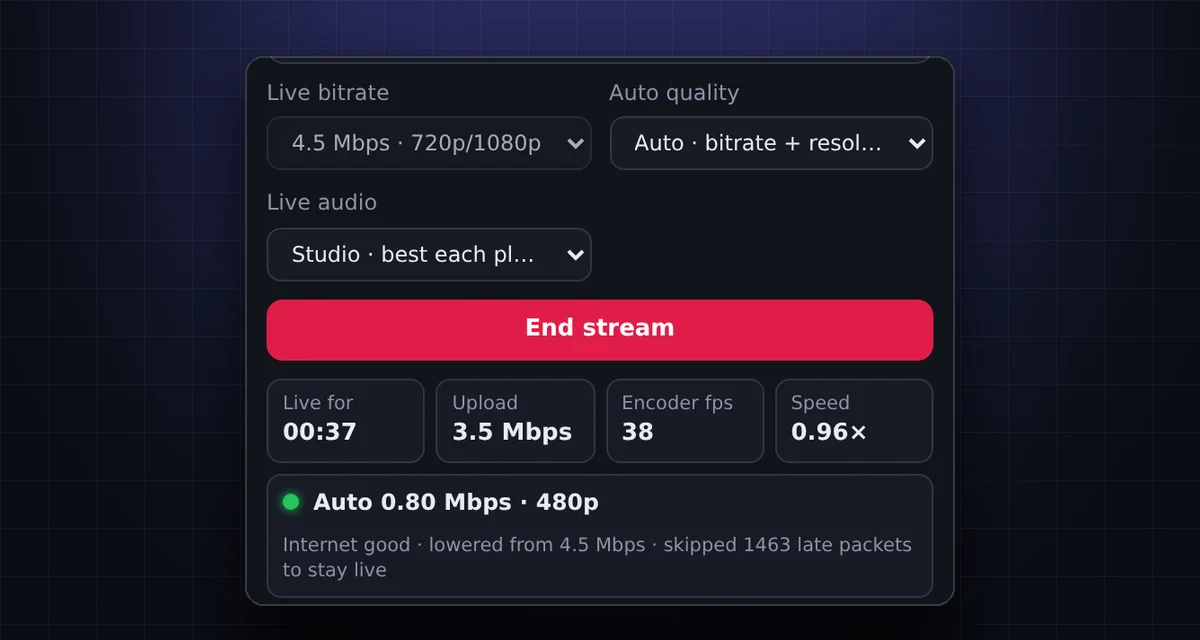
Auto quality while live: the quality was lowered from 4.5 Mbps when the internet slowed down, and the stream is back to Internet good
Auto quality

The stream follows your internet speed.

While you are live, MagicStream checks the upload every second. When the internet slows down, it lowers the quality within seconds so viewers stay live instead of buffering.

  • Lowers the bitrate first, then the resolution if needed
  • Climbs back up by itself when the internet is steady
  • The stream never stops and the sound is never cut
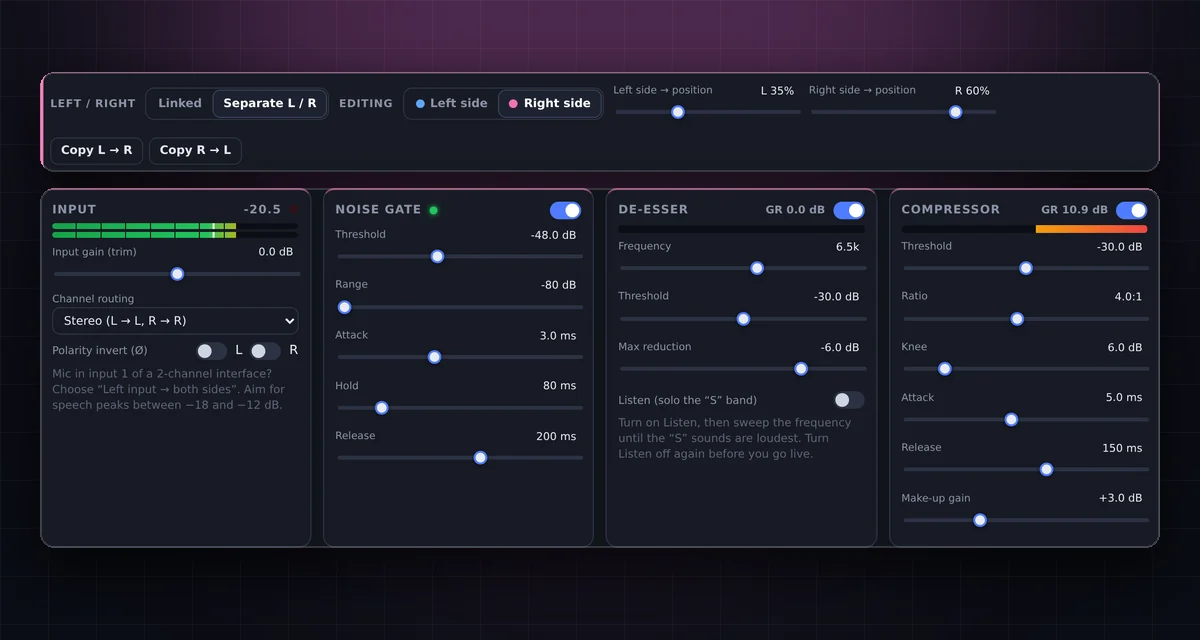
Channel strip with Separate L / R: editing the right side gate and compressor
Left / Right processing

Two sides, two sounds, one stereo mix.

Each input's left and right side can have their own EQ, gate, de-esser, compressor and FX rack. Ideal for two mics on one stereo interface input, or a stereo keyboard.

  • Place each side left, right, centre or anywhere between
  • Stereo effects keep their full width on each side
  • Also on the phone remote; copy one side to the other in one tap
MagicStream vs OBS

OBS is a toolbox. MagicStream is the finished studio.

OBS is free and powerful, but it was made for gamers. A church service needs plugins, scripts, a second PC for slides and an expert at the desk. MagicStream has it all built in.

What you need on SundayMagicStreamOBS Studio
Stream to YouTube, Facebook and TikTok at the same timeBuilt in, one clickNeeds a plugin or a paid restream service
Bible verse appears when the pastor says it"John 3:16", "Yohana sura ya tatu mstari wa kumi na sita"Automatic, English + KiswahiliNot available. Someone types every verse in another program
Camera switching without an operatorAI director follows who is speakingManual, or complex automation plugins
3 camera angles from 1 camerawide, medium and close-up with AI face framingSmart shots, one clickManual crops, no tracking
The internet slows down in the middle of the servicequality follows your upload speed, liveAuto quality lowers bitrate and resolution in seconds, then climbs backDynamic bitrate option (bitrate only, no resolution change)
Use an Android phone as a wireless camerano app, no cable, as many phones as you haveScan a QR code, live in secondsNeeds paid third-party apps and drivers
Mix the sound from your phone while you walk the roomScan a QR code: full mixer, EQ and FXNeeds WebSocket setup and third-party apps
Setup time for a new volunteerMinutes. Open it in ChromeHours of scenes, sources and plugins
Zoom, pan and tilt like a camera operatorwide, full, knee, half, shoulder, close-up, over-the-shoulder, congregationAI camera moves, automatic or one clickNot available without scripts and plugins
Switch cameras from your phone like a Blackmagic ATEMlive multiview, CUT, AUTO, T-bar, fade to blackBuilt in, same QR codeNo phone switcher; needs a hardware panel or third-party apps
Professional EQ7-band parametric, separate Left / Right and Mid / SideBuilt in, with live spectrum3-band EQ, VST plugins for more
Separate EQ, gate, compressor and FX for the left and right side of an inputtwo mics on one stereo input, stereo keyboardsBuilt in: "Separate L / R", one clickDuplicate sources and VST plugins
Choir and backing vocals made to sound like a studio recordSmart Vocals splits, masters and places each voiceNot available
Sermon slides with PREVIEW and TAKEPowerPoint, PDF or picturesBuilt in; the AI changes slides as the pastor speaksCapture the PowerPoint window and click by hand
Pastor's notes that follow the sermonTracks where the pastor is speakingNot available
Local supportWhatsApp, in English or KiswahiliCommunity forums

OBS® is a trademark of its owners and is not affiliated with MagicStream. Compared with standard OBS Studio without extra plugins.

Android phone remote

Walk the room. Mix and switch from your phone.

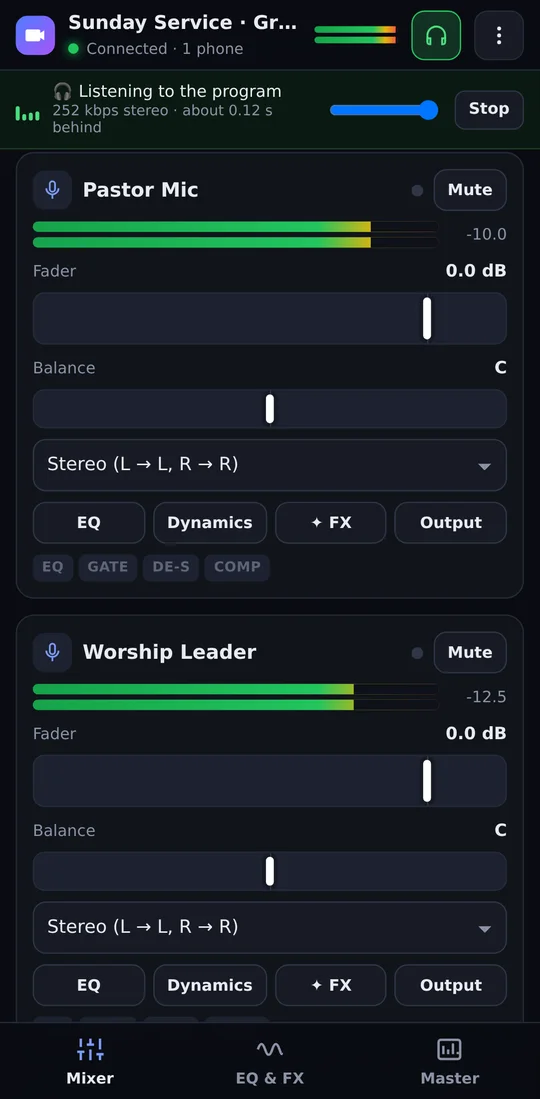
The sound is always different in the hall. Scan a QR code and your Android phone becomes the full mixer, in sync with the studio. Put on headphones to hear exactly what viewers hear, or turn the same phone into an ATEM-style camera switcher.

Phone mixer while listening to the live mix
Mixer and ListenHear the live mix in your headphones
Phone EQ
Full EQEvery band, Left / Right and Mid / Side
Phone FX
FX and Smart VocalsMove voices with your finger
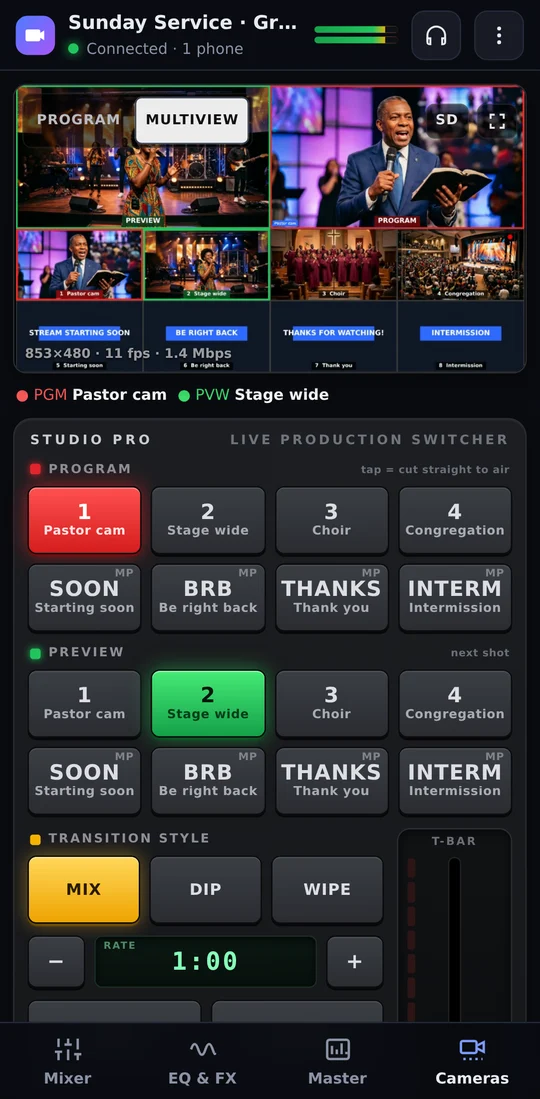
Phone camera switcher in the style of a Blackmagic ATEM, with a live multiview
Camera switcherATEM-style, live multiview, T-bar
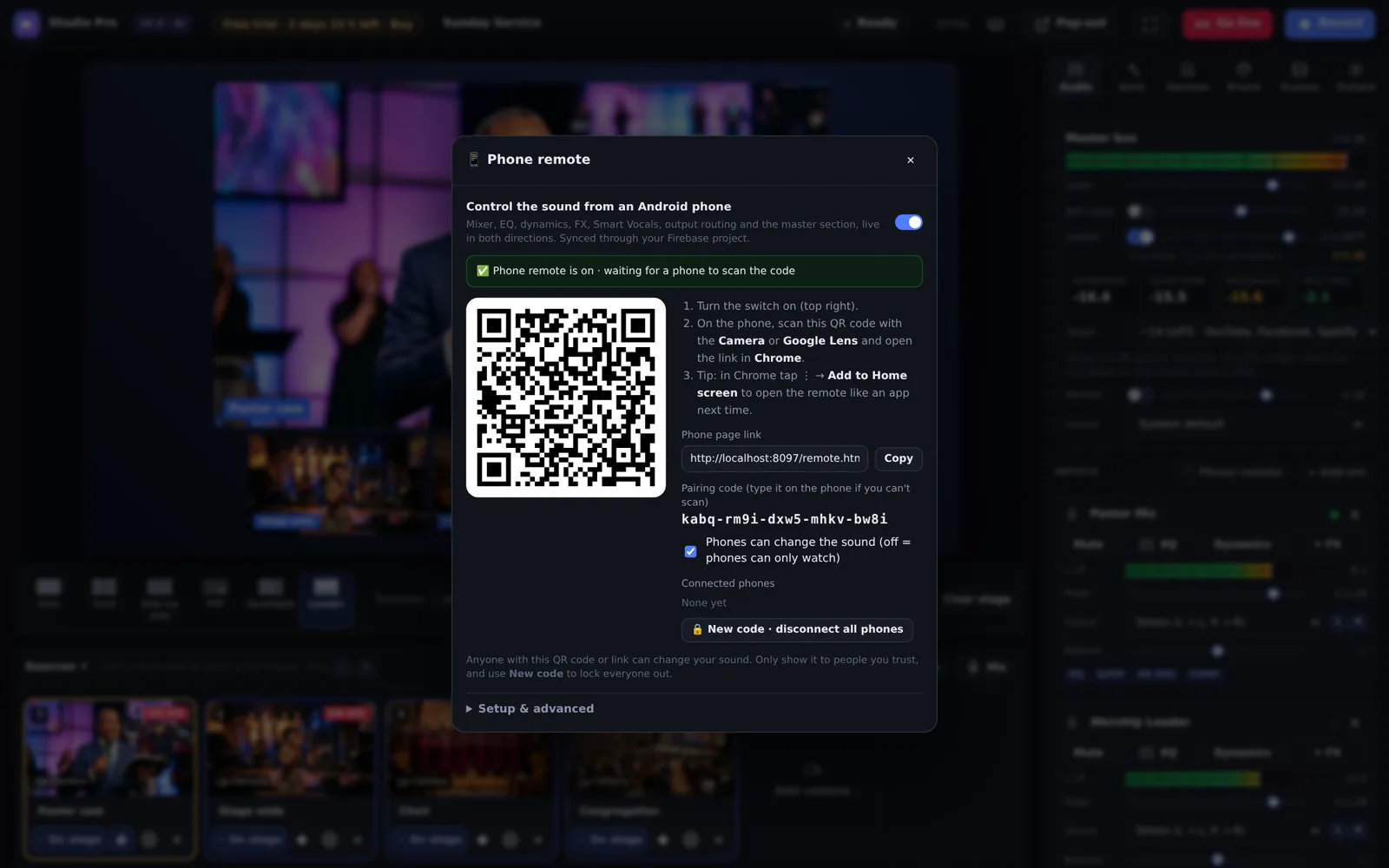
Phone remote · Pair with a QR code
Pair a phone with a QR code
No app store needed

Pair in 10 seconds.

Switch on the phone remote, scan the code with the phone camera and tap Add to Home screen. Next time it opens like an app.

  • Private pairing. Only phones you allow can connect.
  • Several phones at once, for example the sound engineer and the worship leader.
  • Listen to the program mix in studio-quality stereo, with about 0.1 s delay.
  • Switch cameras with PROGRAM and PREVIEW rows, MIX, DIP, WIPE, CUT, AUTO, a T-bar and fade to black.
  • Watch-only mode for phones that should see but not change anything.
Phone as camera

Every phone in church is now a camera.

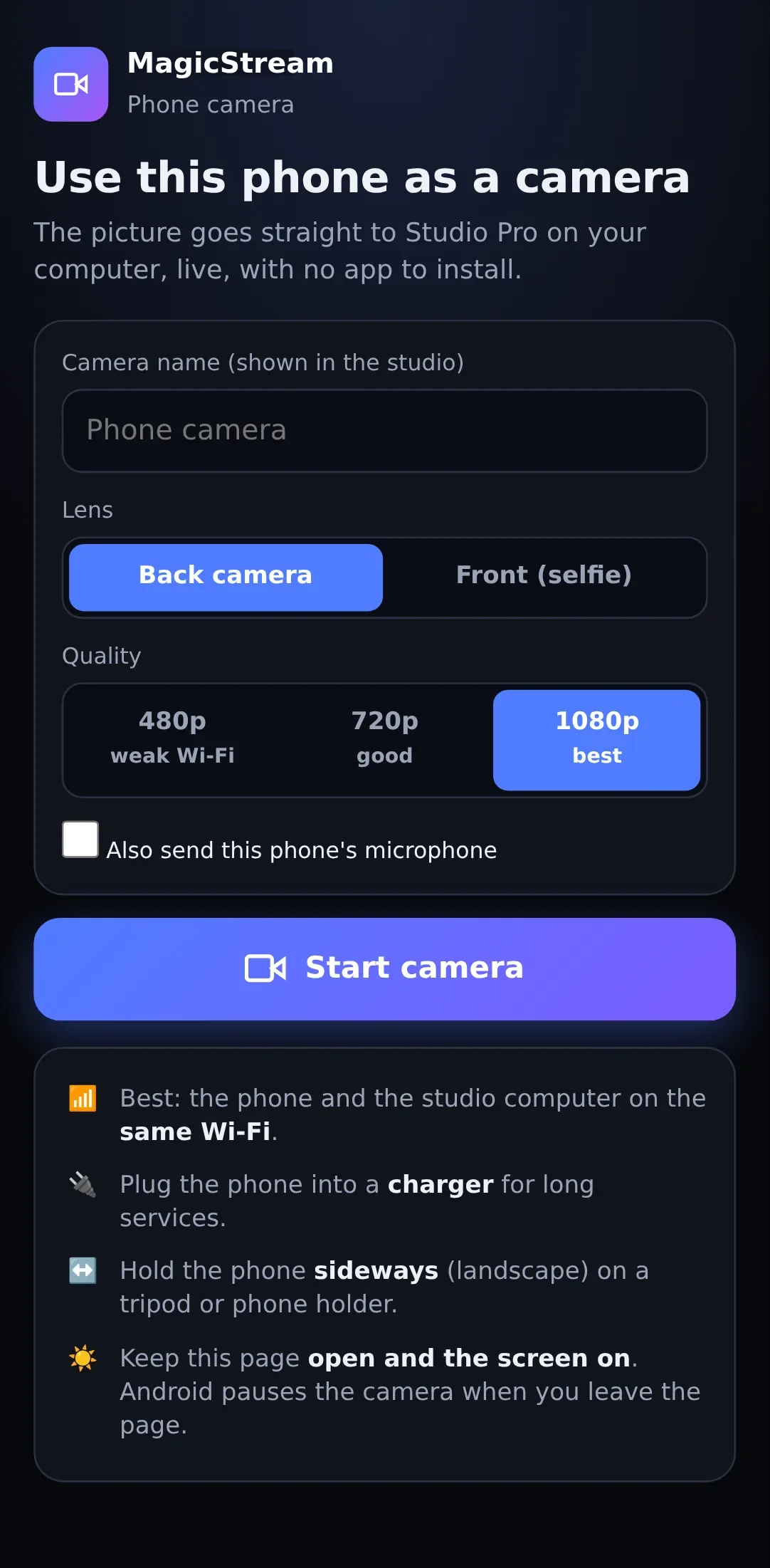
No camera budget? Scan a QR code and an Android phone becomes a wireless HD camera. No app, no cable, no extra software. Put one on the pulpit, one on the choir and one at the back.

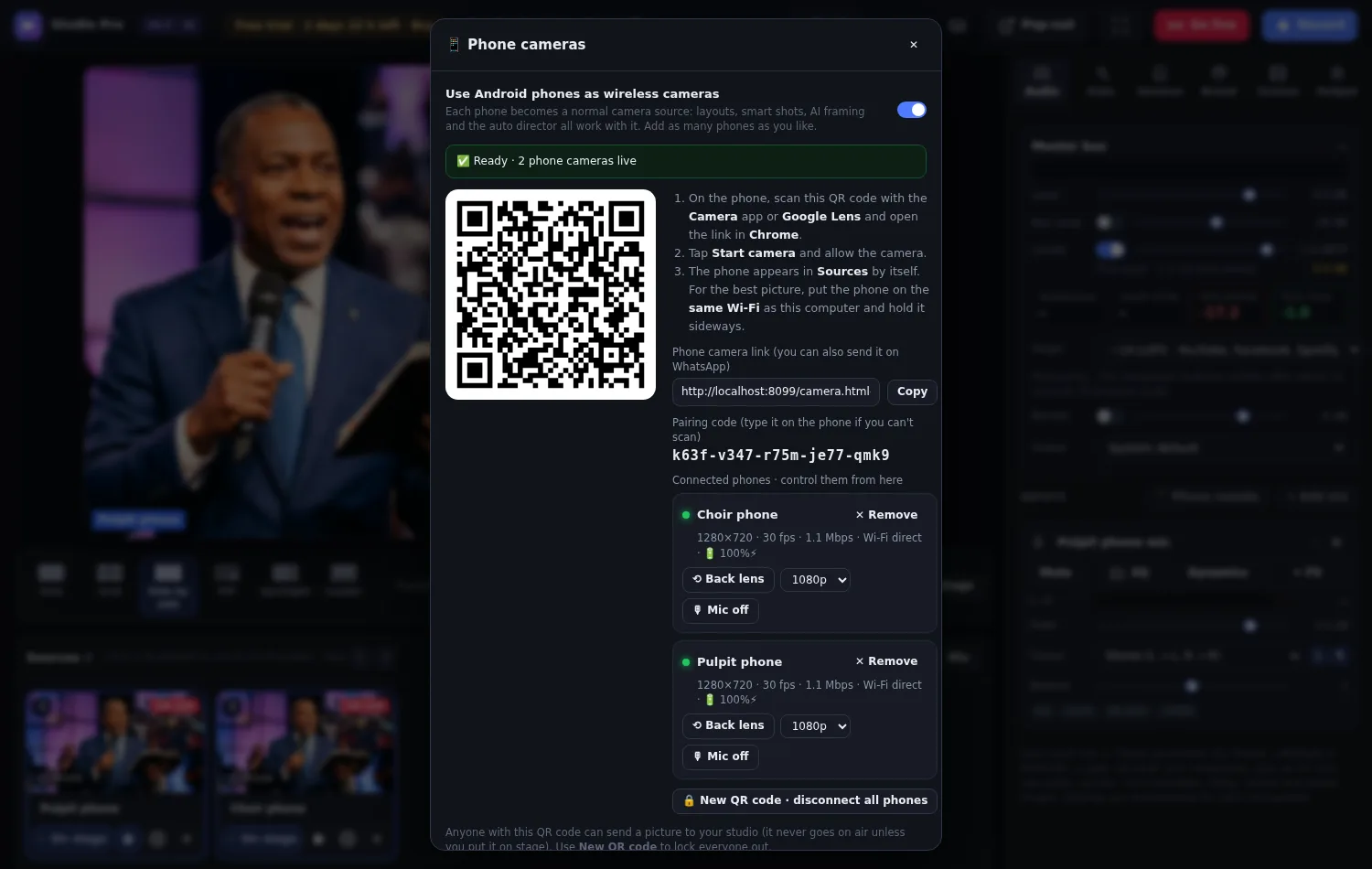
MagicStream · Phone cameras
Phone cameras dialog with QR code and two connected phones
Phone camera page on Android

Scan and go

Click Phone cam in MagicStream, scan the code and tap Start. The phone appears in your sources by itself.

Up to 1080p over Wi-Fi

The picture goes straight from the phone to your computer on the church Wi-Fi. It doesn't use your data bundle.

Control it from the desk

Flip the lens, change quality, zoom and switch the phone light from the studio.

ON AIR tally light

The phone screen glows red when its picture is live, so the person holding it keeps still.

A full camera

Layouts, smart shots, AI framing and the auto director all work with phone cameras.

Never frozen on air

If a phone's battery dies, MagicStream takes it off the program at once and puts it back when it returns.

And the essentials

Everything else you'd expect.

Unlimited cameras

USB cameras, capture cards, Android phones, screen share and videos. As many as your computer can handle.

Pro layouts

Solo, grid, side by side, picture-in-picture, spotlight and leader, with smooth transitions.

Your church brand

Logo, colours, lower thirds, name tags, tickers and backgrounds in a few clicks.

Record while live

A high-quality copy for YouTube uploads, and a lossless 24-bit WAV for the sound team.

Channel router

Send each channel left or right, mono or stereo, for in-ear mixes and recordings.

Light on your PC

Only the effects you switch on run. It works well on an ordinary laptop.

Live this Sunday

Start in three steps.

Create your free account

Enter your name, church and email. Your 3-day trial starts straight away, with no payment.

Open MagicStream

Click Open in your browser, no download needed. Or download it, unzip and double-click start-windows.bat (Mac/Linux: start.sh). Log in with the same account.

Add cameras and go live

Plug in your cameras, paste your YouTube and Facebook keys and press Go live.

Simple pricing

Try everything free for 3 days.

Every feature is included in the trial and in every plan. Just KES 500 a month (or USD 3). Invite one church and pay only KES 200.

We acceptM-PesaKCB bank transfer
FAQ

Questions, answered.

Can't find what you're looking for? We answer on WhatsApp in English or Kiswahili.

What do I need to run MagicStream?

A Windows, Mac or Linux computer with Google Chrome or Microsoft Edge and an internet connection. You can use it straight in the browser or download it. A laptop with an Intel i5 or Ryzen 5 and 8 GB of RAM handles several cameras. For streaming to several platforms at once, about 6 Mbps of upload per platform is ideal. If the internet slows down, Auto quality lowers the quality for you so the stream keeps playing.

Do I have to download MagicStream?

No. Click Open in your browser in Google Chrome or Microsoft Edge and log in with your account. Cameras, the mixer, EQ and effects, the AI director, Bible verses, pastor's notes, the phone remote and recording all work in the browser. When you go live, the browser sends one stream to the MagicStream live server, which passes it on to YouTube, Facebook and your other platforms, so streaming to several platforms uses only one upload. For big setups with many cameras in 1080p or 4K, the download is the better choice because it runs on your own computer. Your account, trial and plan are the same either way.

How does the free trial work?

Create an account and you get 3 full days with every feature. No payment is needed to start. When the trial ends, MagicStream asks you to choose a plan. Your settings, scenes and sound presets are kept. Each computer can have one free trial.

How do I pay?

Open My account, choose a plan and pay by M-Pesa or KCB bank transfer (from abroad you can pay in US dollars by bank transfer or through WhatsApp). Enter the confirmation code and we switch your account on, usually within minutes, and MagicStream unlocks by itself. If those don't work for you, tap WhatsApp and we will help you pay another way.

What is the launch offer?

The first 100 customers pay only KES 200 a month instead of KES 500. Start your free trial, then choose the launch price in My account. When every place is taken, the offer closes. You can keep paying KES 200 by inviting another church (see below).

How does the invite offer work?

Every account has its own invite link and code in My account. Share it with another church or ministry. When someone you invited is on a paid plan, your price drops from KES 500 to KES 200 a month, for as long as at least one person you invited keeps a paid plan. They get the normal 3-day free trial.

Does the Bible verse detection work in Kiswahili?

Yes. It understands English, Kiswahili and a mix of the two, for example "Yohana mlango wa tatu mstari wa kumi na sita" or "Romans 8 verse 28". The KJV and Biblia Takatifu (Neno) are built in.

Can I use my phone as a camera?

Yes, it is built in. In MagicStream click Phone cam, scan the QR code with an Android phone and tap Start camera in Chrome. No app and no cable. Connect as many phones as you like; each one works like a normal camera with layouts, smart shots and the AI director. For the best picture, put the phones on the same Wi-Fi as the studio computer and plug them into a charger.

Does the phone camera use my internet bundle?

On the same Wi-Fi, no. The picture goes straight from the phone to the studio computer over your local network. Only a tiny pairing message uses the internet. A phone on mobile data can also connect, but then the picture uses its data bundle.

What happens if our internet slows down while we are live?

Auto quality notices within a few seconds and lowers the video bitrate, and the resolution if needed, so viewers stay live instead of buffering. The stream does not stop and the sound is not affected. When the internet is steady again, the quality climbs back up by itself.

How many computers can I use?

One account can be used on a set number of computers (2 by default). You can see and manage your computers in My account. If you need more, chat with us.

Do I need YouTube or Facebook passwords?

No. MagicStream only needs the stream key and server URL that each platform gives you. Your passwords stay private.

Ready when you are

Give your church a broadcast to be proud of.

Start the free trial today and go live with a professional service this Sunday.

No payment to startEvery feature includedLocal support